


Metric Halo Mobile I/O +DSP ~ How to use +DSP with Digital performer
1) Loop S/PDIF as shown
- ADAT can be used in the same manner if desired
- Set DI Source within MIOConsole to S/PDIF (see image under step 3)
NOTE
- AES works in the same manner as explained with S/PDIF
- Before you begin, you should try to make sure you can see signal on DAW 3-4 when your host application output is set to Analog 3-4 as shown in Step 3
- This tutorial was tested with DP4.12 and Logic Audio 6.3.1

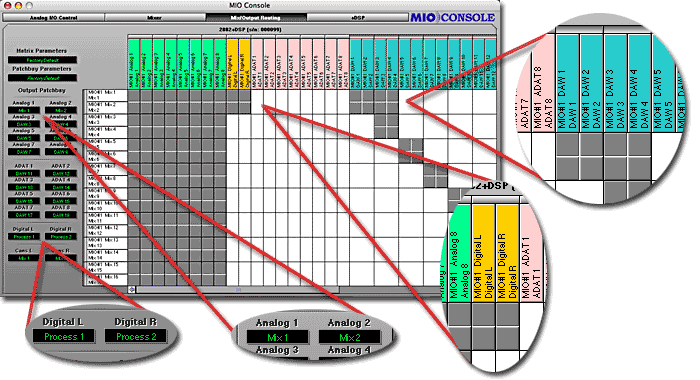
2) Routing in MIOConsole
- Enable DAW 3-4 to Mix 1-2
- Enable Digital L-R to Mix 1-2
- Assign Digital L-R output to Process 1-2
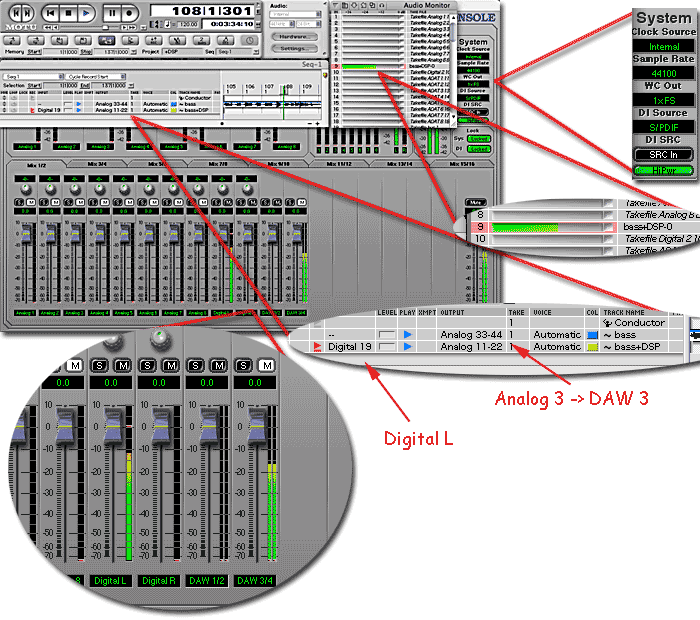
3) Configure Digital Performer
- Assign source track output to Analog 3, which will show up as DAW 3 in MIOConsole
- Create a new track that input is Digital L, which signal is +DSP return
- Note that Digital Performer input/output naming is somewhat buggy
4) Create +DSP instance(s)
- Set the source to DAW 3 as Digital performer Analog 3 output
- Set the target to Process 1, which then will be routed to Digital L as step 2)
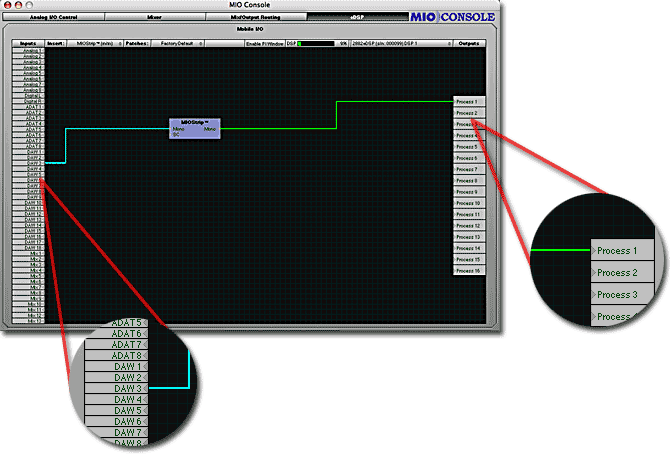
Note : The +DSP signal is now monitored at Mix 1-2 even without Digital Performer's Input Monitoring engaged because it is done within Mobile I/O. The +DSP return signal can be printed by simply arm the target track within Digital Performer.