How a Bus-Powered Device Can Fry a Mac FireWire Port
 This article makes use of information originally published by Ratoc Systems on their website in order to warn users of their FireWire devices about faults in Apple's FireWire circuit design. The original Japanese article can be found here. Authorization to translate and use information from the original article for reposting here has been requested but not yet granted. While the images used here are from the original article, the text was not translated directly. We chose to exclude information specific to Ratoc Systems' products and instead focus specifically on how the FireWire port gets fried and which Macs are at risk. Please note this translation is intended only to help fellow audio engineers, and neither Ratoc Systems nor A-NO-NE Music can be held responsible for errors.
Summary: This article explains how some Mac models' FireWire ports can get fried by the connection of bus-powered FireWire devices. (Note that this is not to be confused with PowerBook G4 screen shutdown at bus-powered device connection, which does not cause physical damage. When screen shutdown happens, the computer may be still functional if not crashed and you should be able to see the desktop, but the screen backlight is not lit. Most of the time you can recover from this by putting the PowerBook to sleep and then waking it up which resets the backlight circuitry. To do this, close the PowerBook and wait a minute or so for the sleep indicator--if it comes on, you can simply reopen and continue working; if it does not sleep, you will need to hard-reboot.)
How to protect: Use one or more of the following solutions to protect your Mac's FireWire circuitry from getting fried by a bus-powered device:
- Use a FireWire hub.
- Buy and use FireWire cables that do not have bus-power pins.
- When using dual-power devices, plug in and/or turn on the optional AC power source before connecting the device to the Mac.
- Power down your Mac before connecting FireWire devices.
Note that since FireWire bus power is active in order for the port to function as a repeater even when the Mac is in sleep mode, putting the Mac to sleep before connecting a device will not offer any protection.
List of tested Apple Macintosh Computers at Ratoc Systems as of June, 2002
| Apple Macintosh Computer models found to be susceptible to damage. | PowerMac G4 450 | M5183 |
| PowerMac G4 400 | M7824J/A | |
| PowerBook G4 400 | M5884 | |
| PowerBook G4 500 | M7710J/A | |
| iMacDV SE 400 | M7671J/A | |
| Apple Macintosh Computer model modified with an ESD Protection Chip that prevents damage. | PowerBook G4 (DVI) 667 | M8591J/A |
| Apple Macintosh Computer model found not to sustain damage even when the voltage spike was detected. |
PowerMac G4 800 (QuickSilver) |
M8493J/A |
| Apple Macintosh Computer models that did not exhibit the damage-causing spike. | iMac G4 800 (Flat Panel) |
M6498 |
| iBook 700 | M8602J/A | |
According to Metric Halo, the PowerBook G3 "Pismo" was made using early FireWire circuitry which does not exhibit the voltage spike. And Apple Computer has announced that all units manufactured after Summer 2002 have been modified to address the problem and are not at risk. |
||
The mechanism of the spike that damages FireWire port
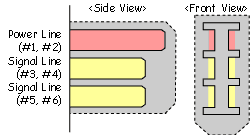 A FireWire cable's power terminals are longer than its signal line terminals. In order to protect signal lines and circuitry, power connection is established before the signal lines make contact, and when unplugging, signal lines disconnect before power.
The spike
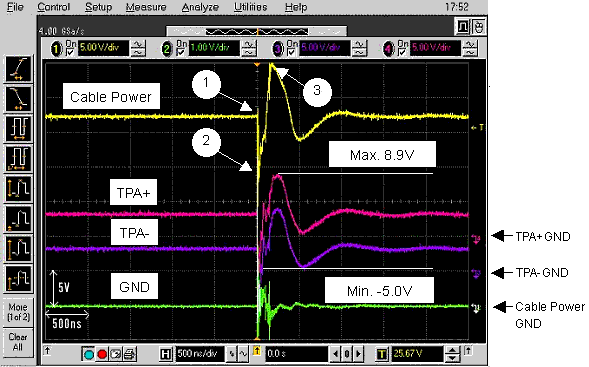
(1)Line noise at power terminal contact (2)Voltage drop at device powering up (3)The damage-causing SPIKE
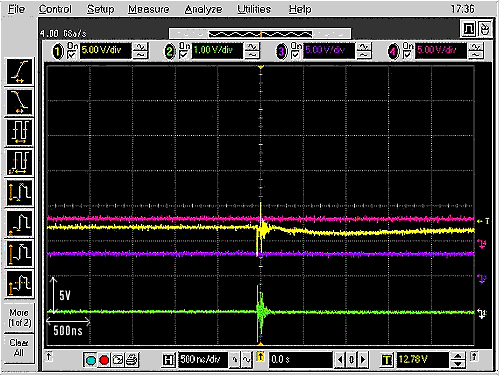
This voltage spike goes through a line regulator on the motherboard, reaching the PHY chip at up to 8.9v. The PHY chip is designed to handle only 3.8v - 4.1v, and though the spike voltage amount is inconsistent, varying from one instance to the next, if and when the spike exceeds the PHY chip's capacity, the chip will fail.
When FireWire Hub is used